Upload Your Models
Upload your custom models to Smart Studio for deployment and fine-tuning. You can manage your uploaded models in the My Models section and deploy them for inference or use them as base models for further fine-tuning.
How to Upload Your Model
Navigate to the My Models section and click the Upload Model button in the upper-right corner.
Upload Process
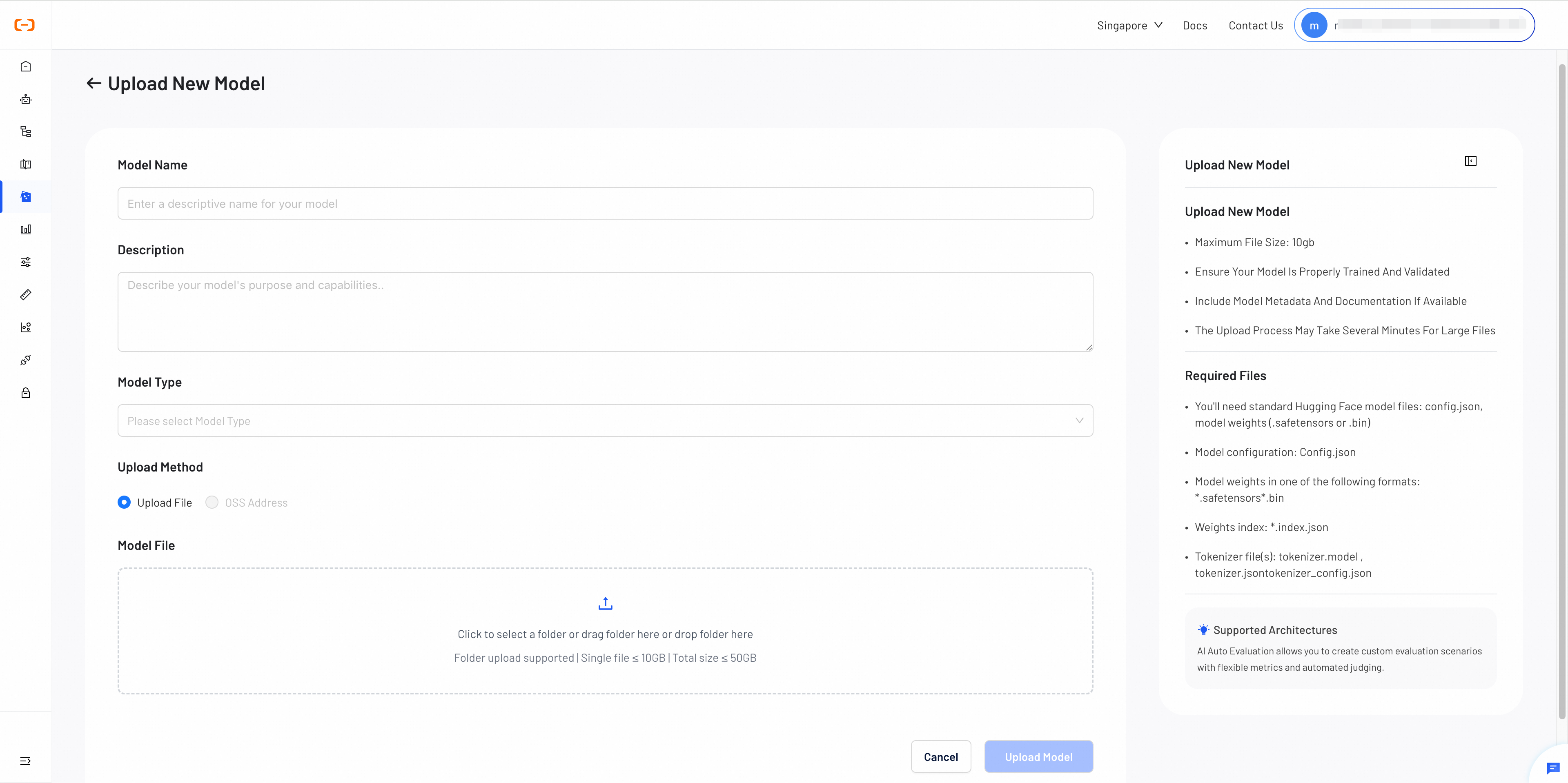
When uploading your model, provide the required information and choose your upload method:
Upload Configuration
Required Information
- Model Name
- Description
- Model Type: LLM, VLM, or Multimodal, Embedding, Reranker
Upload Methods
- Direct Upload: Upload files directly from your local machine
- OSS Address: Provide OSS address where files are stored
- Verify all required files are present before uploading
- Use safetensors format for better security and performance
- Test your model locally before uploading to ensure compatibility
- Include chat_template in tokenizer_config.json for chat completions support
Required Model Files
For successful model deployment, your model files need to contain the following essential components in standard Hugging Face Format: config.json, Model weights, and Tokenizer files.
The required model files depend on the model's architecture. In general, you'll need the following components to complete a model upload.
Configuration Files
- Model Configuration:
config.json
This file defines the model architecture, hyperparameters, and configuration settings required for model initialization and inference.
-
Model Weights: must be provided in one of the following formats:
-
.safetensors (Recommended)
A safer, more efficient format for storing model weights, offering improved security and faster loading times than traditional formats.
-
.bin (Alternative)
A traditional PyTorch binary format. It's widely supported but less secure than the safetensors format.
-
-
Weights Index:
\*.index.json
This file maps model parameters to their corresponding weight files and is required for models with multiple weight files or sharded weights.
Tokenizer Files
Tokenizer files are essential for text processing. Please include the following files:
-
tokenizer.model: SentencePiece model file containing the tokenization rules and vocabulary.
-
tokenizer.json: Tokenizer configuration in JSON format with encoding and decoding settings.
-
tokenizer_config.json: Tokenizer configuration file with initialization parameters and special tokens.
Chat Completions API Support
Enabling chat completions: To enable the chat completions API for your custom base model, ensure your tokenizer_config.json contains a chat_template field. See the Hugging Face guide on Templates for Chat Models for details.
Supported Architectures
Smart Studio supports most popular model architectures. You can upload models based on the following architectures for deployment and fine-tuning:
Supported Model Families
| Model Family | Supported Versions |
|---|---|
| DeepSeek Series | DeepSeek V1, V2 & V3 |
| Qwen Series | Qwen, Qwen2, Qwen2.5, Qwen2.5-VL, Qwen3 |
| Kimi Family | All Kimi model variants |
| GLM Family | ChatGLM and GLM series models |
| Llama Series | Llama 1, 2, 3, 3.1, 4 |
| Mistral & Mixtral | Mistral and Mixtral model architectures |
| Gemma | Google's Gemma model family |
| GPT-OSS | GPT-OSS 120B and 20B |
If your model's architecture isn't listed, please contact our support team to confirm compatibility. We will continuously add support for new architectures based on community demand and model popularity.
Next Steps
After uploading your model to My Models, you can deploy or fine-tune it based on your requirements.
Create a deployment endpoint for your model to start serving inference requests in production.
Use your model as a base for fine-tuning with your custom datasets to improve performance on specific tasks.