Direct Preference Optimization for LLMs
Learn how to train models using Direct Preference Optimization (DPO) to align model behavior with human preferences through comparative feedback.
Purpose and Overview
Direct Preference Optimization (DPO) is an advanced training method that optimizes models based on human preferences and comparative feedback. Unlike traditional supervised fine-tuning, DPO directly learns from preference rankings to align model behavior with human values and expectations.
Step 1: Choose Base Model
Select an appropriate base model as the foundation for your DPO training process. The choice of base model significantly impacts the final performance and alignment capabilities of your optimized model.
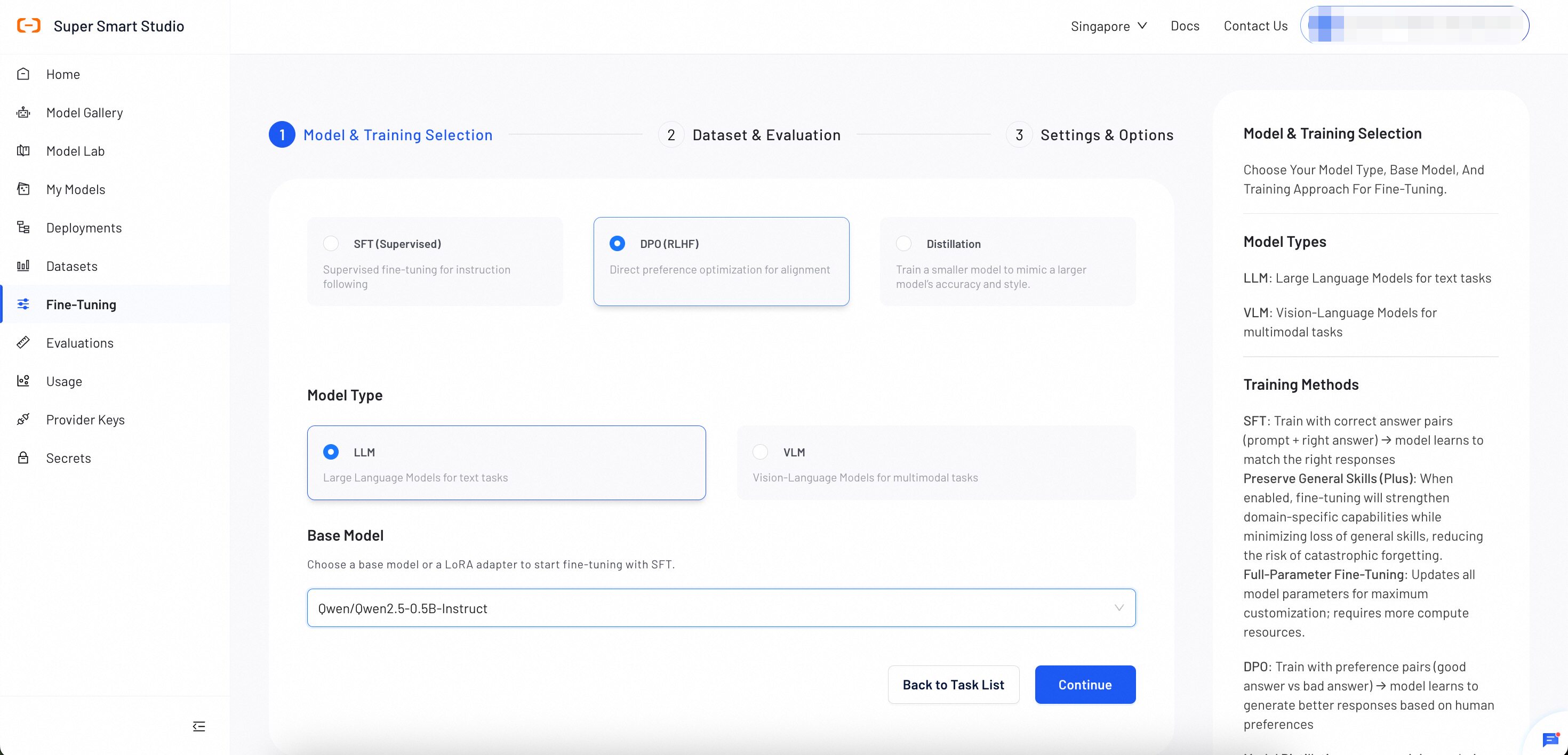
Model Selection Guidance
Select a base model as the foundation for fine-tuning. The choice of base model impacts the final performance and capabilities of the fine-tuned model. Review candidate model details in Model Gallery before fine-tuning.
- Start with Instruct models for most conversational applications. (e.g.,
Qwen3-4B-Instruct-2507) - Choose Thinking models when your task requires step-by-step reasoning. (e.g.,
Qwen3-4B-Thinking-2507) - Use base (Dense) models when you need maximum customization flexibility. (e.g.,
Qwen3-4B) - Consider MOE models for production deployments requiring both high performance and efficiency. (e.g.,
Qwen3-30B-A3B)
After completing all selections, click Continue.
Step 2: Dataset & Evaluation
Upload a training dataset and configure evaluation settings to monitor training progress and model performance.
Smart Studio provides multiple ways to prepare datasets:
- Upload a dataset directly. For instructions, see Create Datasets.
- Use AI Dataset Preparation to automate the dataset creation process.
- Provide the OSS address of the data without uploading the file to the platform.
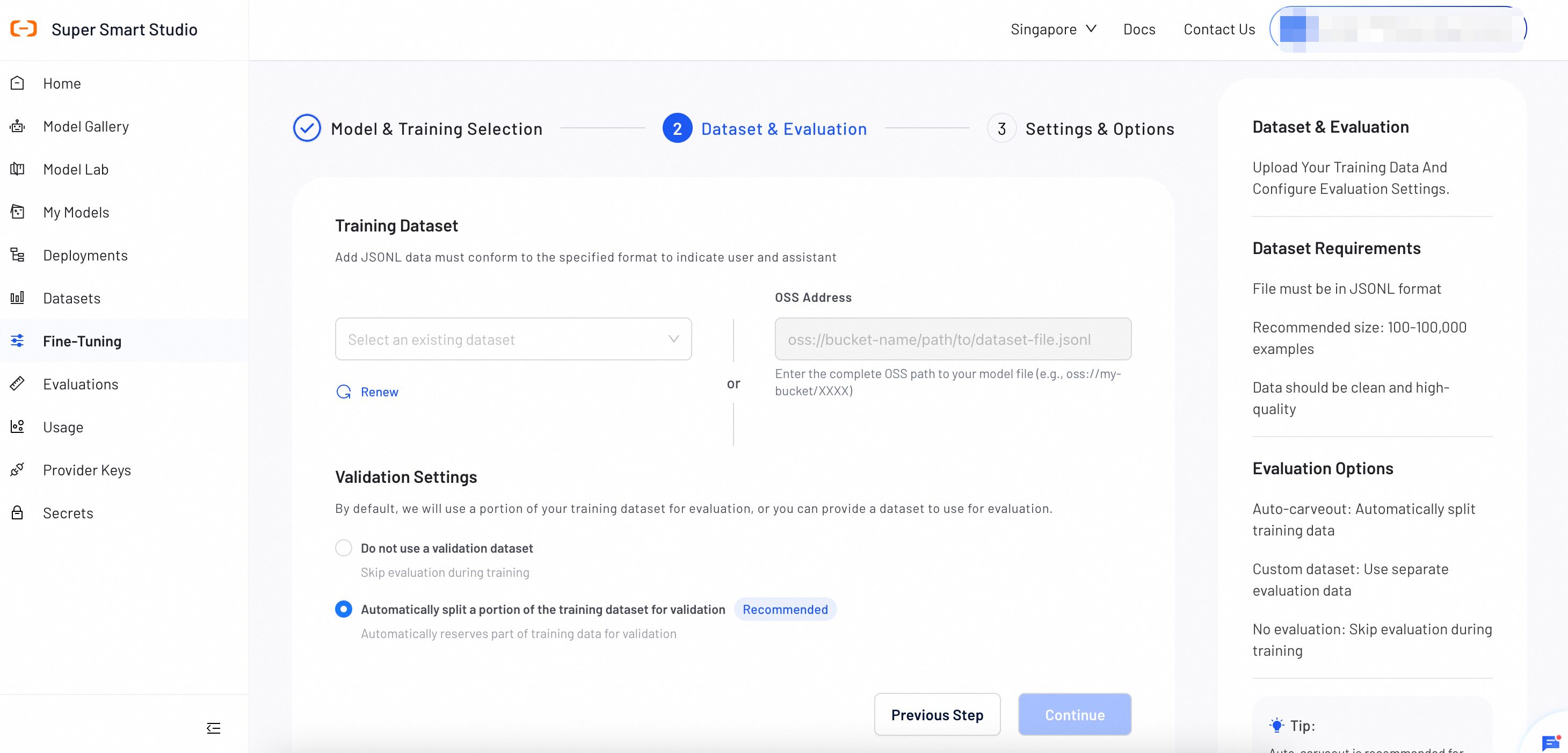
Dataset Requirements
File Format
File must be in JSONL format with each line containing preference pairs with chosen and rejected responses.
Dataset Size
Recommended size: 100-100,000 preference pairs. Quality preference data is more important than quantity for DPO.
Preference Quality
Clear preference distinctions are essential. Ensure chosen responses are consistently better than rejected ones.
- Ensure clear quality differences between chosen and rejected responses
- Include diverse scenarios covering different aspects of alignment
- Maintain consistent preference criteria throughout the dataset
- Validate that preference rankings reflect human values and safety
Required Data Format
{
  "messages": [
    {"role": "system", "content": "<system>"},
    {"role": "user", "content": "<query>"},
    {"role": "assistant", "content": "<response1>"}
  ],
  "rejected_response": "<reject_response>"
}
Format Explanation
-
messages: Contains the conversation context and the preferred (chosen) response
-
rejected_response: The less preferred response for the same context
-
system: Optional system prompt defining the assistant's role and behavior
-
user: The user query or prompt that both responses address
-
assistant: The preferred response (chosen) in the messages array
Example Data Formats
{
  "messages": [
    {"role": "system", "content": "You are a helpful and harmless assistant"},
    {"role": "user", "content": "Tell me about tomorrow's weather"},
    {"role": "assistant", "content": "Tomorrow will be sunny"}
  ],
  "rejected_response": "I don't know"
}
{
  "messages": [
    {"role": "system", "content": "You are a helpful and harmless assistant"},
    {"role": "user", "content": "What does 1+1 equal?"},
    {"role": "assistant", "content": "1+1 equals 2"},
    {"role": "user", "content": "What does 1+1 equal?"},
    {"role": "assistant", "content": "Equals 2"}
  ],
  "rejected_response": "I don't know"
}
Step 3: Settings & Options
Configure DPO training parameters and model settings. Default values are optimized for preference learning, but you can adjust them based on your specific alignment requirements and dataset characteristics.
Basic Configuration
Custom Model Name
Used for display in My Models for management purposes. Choose a descriptive name that helps you identify the model's purpose and version.
Example: "Safety-Aligned-Assistant-v1" or "Human-Preference-Chatbot"
Task Display Name
Set a display name for this DPO training task. This name appears in the Fine-tuning task list and helps you track alignment progress and history.
Example: "Q1-2025-DPO-Alignment" or "Safety-DPO-Training-Jan"
Training Parameters
The following parameters apply to all fine-tuning methods unless otherwise noted. LoRA is the default fine-tuning method.
| Parameter | Definition | Tuning Impact |
|---|---|---|
| epoch | The number of complete passes through the training dataset. | Increase: More learning opportunities, but the model may perform well on training data while producing poor results on new inputs. Decrease: Trains faster, but the model may not learn enough to perform well. |
| batch_size | Defines the number of training examples to process in a single group. The model learns from each group before moving to the next. | Increase: Produces more consistent training updates, but uses significantly more GPU memory. Decrease: Reduces GPU memory usage, but training updates may become less consistent. |
| learning_rate | Controls the size of each adjustment the model makes during training. | Increase: The model learns faster, but training may become unstable and fail to reach a good solution. Decrease: Training becomes more stable and precise, but takes longer and may settle for a solution that is not optimal. |
| lora_rank | Sets the learning capacity of the LoRA adapters. | Increase (e.g., 16, 32): Improves the model's ability to learn complex tasks, but uses more GPU memory. Decrease (e.g., 4, 8): Reduces GPU memory usage, but the model may struggle with complex tasks. |
Advanced Parameters
These parameters work well with default values for most use cases. Adjust only when needed.
| Parameter | Definition | Tuning Impact |
|---|---|---|
| max_context_length | Sets the maximum token limit per example. Texts exceeding this limit will be truncated. | Increase to learn from longer texts, but this significantly increases GPU memory usage. |
| warmup_ratio | Specifies the fraction of the training process to use for a "warm-up" phase. During this phase, the learning rate slowly increases to prevent early training instability. | A small value (0.03–0.1) is generally recommended. This is primarily a stability mechanism, not a performance tuning parameter. |
| gradient_accumulation_steps | Specifies the number of small batches to process before the model performs a single learning update. This simulates a larger batch size to save memory. | Increase to achieve more stable training at the cost of slower speed. A value of 1 disables this feature. |
| target_modules | Identifies the specific internal components (layers) of the model that will be modified by LoRA. | Adding more modules allows more comprehensive adaptation but increases trainable parameters. |
| beta DPO | KL regularization coefficient. Controls how closely the trained model stays to the reference model's behavior during DPO training. | Increase to keep the model closer to its original behavior, reducing the risk of overfitting to preference data. |
After reviewing all the configuration, click Create Task to begin the training process.
Step 4: Monitor Training Progress
During and after training, check key training metrics at any time.
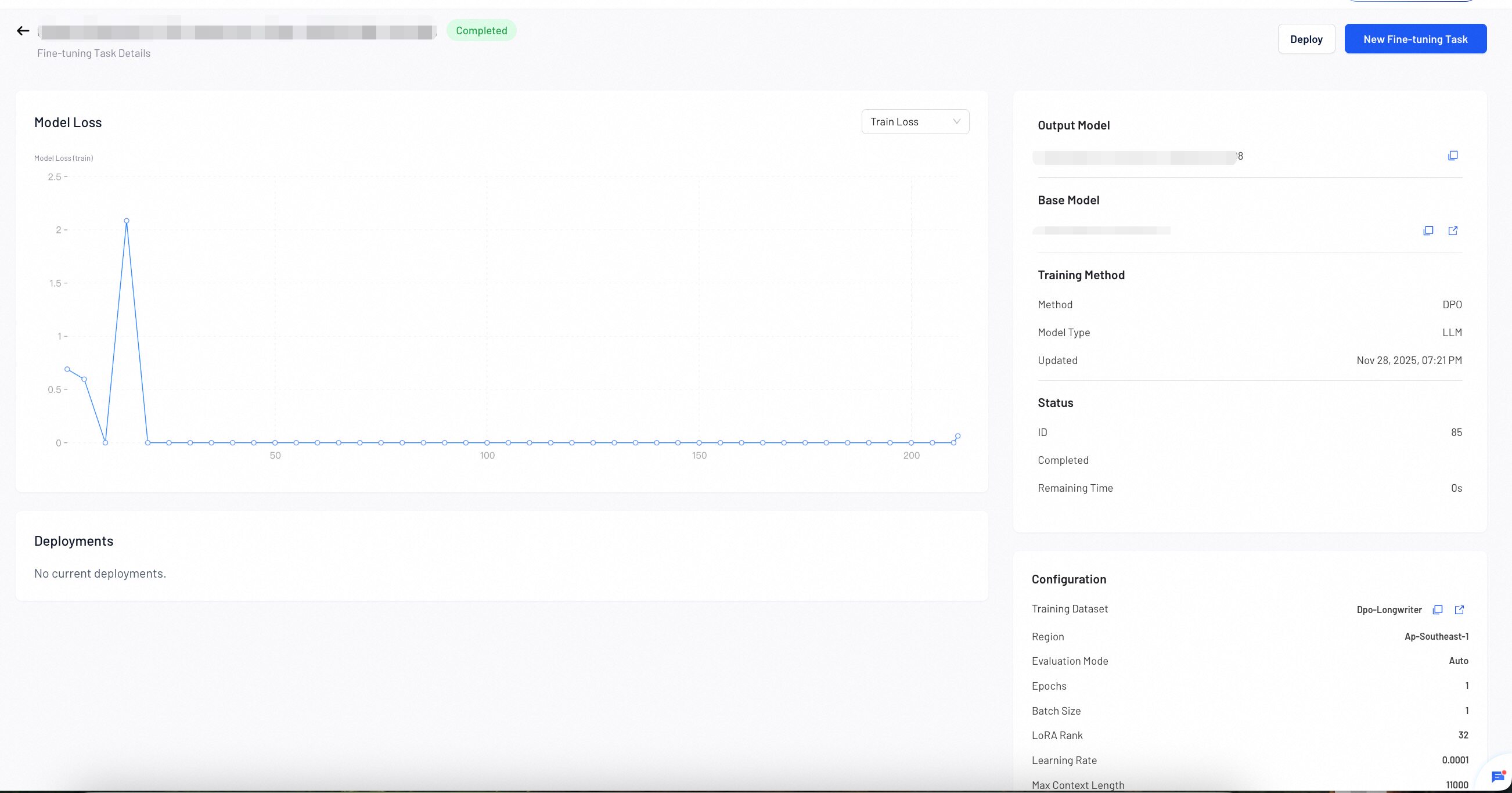
The Model Loss chart displays two metrics:
- Training Loss: Measures how well the model learns from your training data.
- Validation Loss: Measures how well the model generalizes to unseen data.
- If both losses decrease steadily, your model is learning well. Continue training.
- If training loss decreases but validation loss increases, your model may be overfitting. Stop training and deploy the current model.
- If both losses remain high or increase, your training data or configuration may need adjustment. Review your dataset and parameters.
DPO Parameter Guidelines
- Beta parameter: Controls the strength of preference learning - higher values make the model more conservative
- Start with defaults: Default values work well for most preference optimization tasks
- Monitor alignment: Track preference accuracy and safety metrics during training
Next Steps
Once training is complete, deploy your fine-tuned model to a production endpoint for real-world usage.
Call your fine-tuned models through the unified API endpoint.