User Control
The User Control page manages administrator access and permissions for your organization. It provides a unified interface to create admin users, assign granular permissions, and define reusable roles. Access to this page requires the User Control permission.
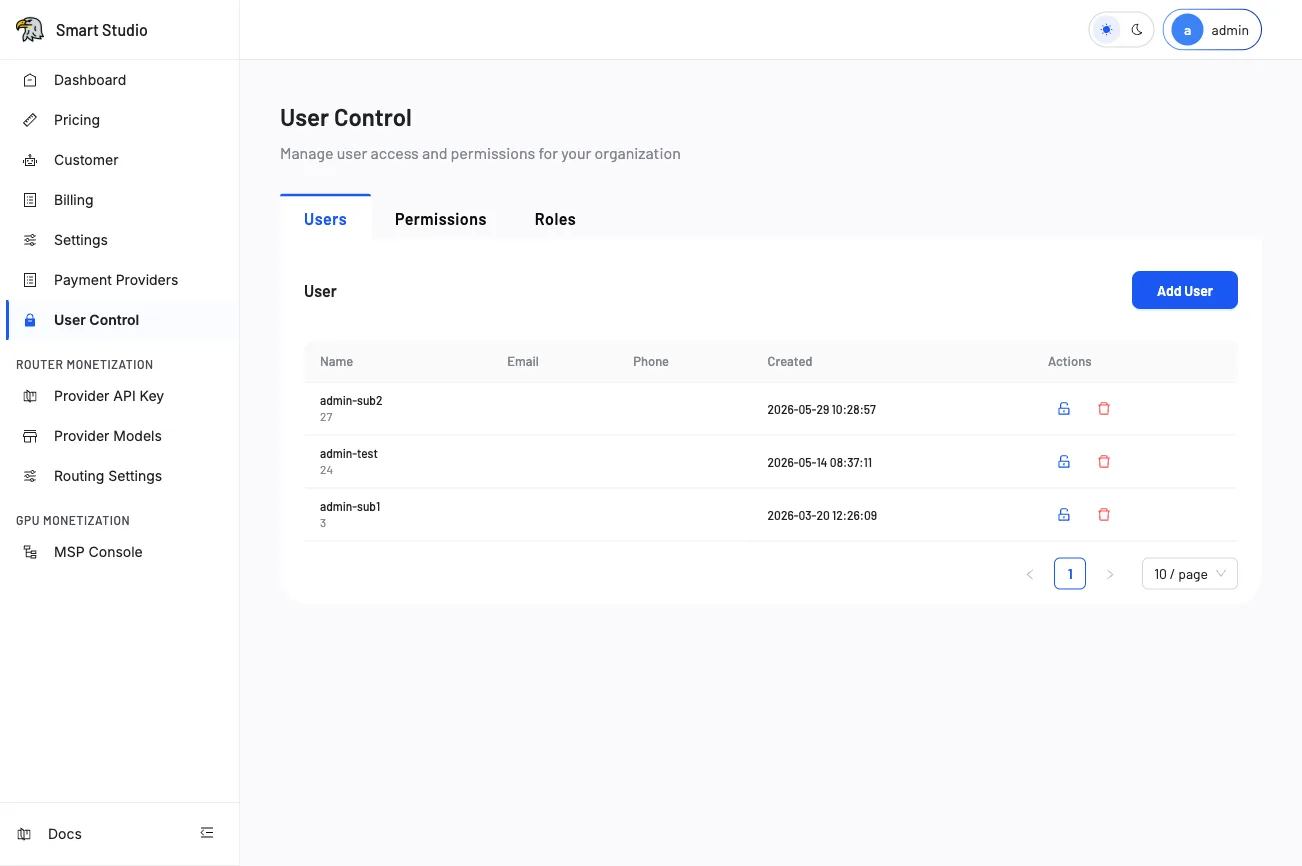
Overview
User Control is organized into three tabs:
- Users — List, create, and remove administrator accounts.
- Permissions — View and manage individual permission assignments.
- Roles — Define permission groups that can be assigned to multiple users.
The subtitle "Manage user access and permissions for your organization" reflects the scope—all operations apply to the current tenant's admin environment.
Before you change access
- Identify the administrator and the minimum permissions required for their role.
- Preserve at least one working full-access administrator to avoid lockout.
- Review whether the user should access all data or only their own data scope.
- Confirm with relevant stakeholders before revoking permissions from active administrators.
Users tab
The Users tab displays a paginated table of all administrator accounts.
Table fields
| Column | Description |
|---|---|
| Name | The administrator display name and numeric user ID shown below it. |
| The registered email address for the administrator. | |
| Phone | The phone number associated with the admin account. |
| Created | The date and time when the administrator account was created. |
| Actions | Icons for editing permissions (shield icon) and deleting the user (trash icon). |
Add an administrator
- Click the Add User button in the upper-right corner.
- Enter the administrator's name, email, and optional phone number.
- Assign initial permissions or a predefined role.
- Submit the form and verify the new admin appears in the Users list.
Remove an administrator
- Locate the administrator in the Users table.
- Click the red trash icon in the Actions column.
- Confirm the deletion in the dialog prompt.
Removing an administrator revokes all their access immediately. Ensure at least one full-access admin remains to prevent tenant lockout.
Permissions tab
The Permissions tab lists all available permission scopes for the tenant. Permissions control visibility and access to specific Admin menu items and operations:
- Customer Management — Access to the Customer page.
- Pricing — Access to model pricing configuration.
- Billing — Access to billing records and export.
- User Control — Access to this User Control page itself.
- Provider API Key — Manage provider API key configuration.
- Provider Models — Access to router monetization model catalog.
- Settings — Access to tenant-level configuration.
Roles tab
Roles allow you to bundle multiple permissions into a single assignable unit:
- Navigate to the Roles tab.
- Create a new role with a descriptive name (e.g., "Billing Admin", "Read-Only Viewer").
- Select the permissions to include in the role.
- Assign the role to one or more administrators from the Users tab.
Verify the result
Confirm the updated user and permission set by:
- Checking the Users table for the expected admin accounts.
- Asking the affected administrator to log in and verify their menu visibility matches the assigned permissions.
- Validating access without sharing passwords or session tokens.
Troubleshooting
- If an Admin menu item remains hidden, compare the menu's documented permission name with the user's assigned permissions in the Permissions tab.
- If a newly created user cannot log in, verify the authentication method (email/password or SSO) is correctly configured.
- If pagination shows no users, check that you are in the correct tenant context.
Tips
- Use Roles for teams with identical permission needs—this simplifies bulk permission changes.
- Audit the Users list regularly to remove inactive administrators.
- The numeric ID below each user name is the stable identifier used in API-based user management.
- Consider using SSO for organizations that require centralized identity management.
Next Step
Use SSO if administrators should authenticate through an external identity provider. For customer-level access management, see Customer.