Billing
Admin Billing provides a comprehensive view of platform financial activity across two dimensions: customer charges and provider costs. It enables administrators to track revenue and monitor upstream expenses — all from a unified interface. It requires the Billing permission and is hidden for system tenants (banSystem).
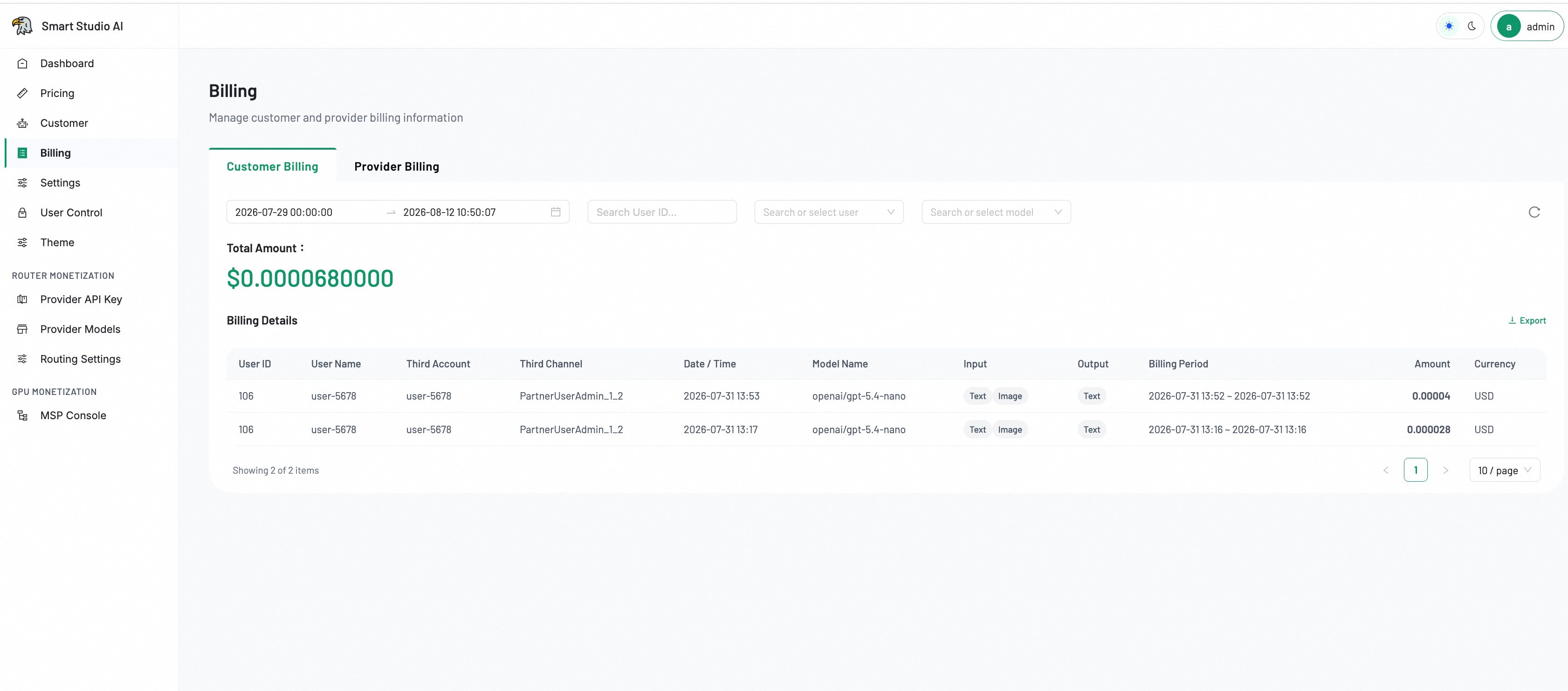
Access billing
- Open the Admin Console and navigate to Billing in the left sidebar.
- The page displays two tabs: Customer Billing and Provider Billing.
- Select the appropriate tab based on the billing data you need to review.
Overview
The Billing page is organized into two tabs: Customer Billing and Provider Billing. Each tab provides a filterable, paginated table of billing records with export capabilities. The page header reads: "Manage customer and provider billing information."
Customer billing tab
The Customer Billing tab displays charges attributed to end customers for their API usage:
Filters
- Date/Time Range — Full timestamp picker (e.g.,
2026-08-04 00:00:00to2026-08-04 23:59:59). Supports arbitrary date ranges. - User ID — Search by specific user identifier.
- User Name — Dropdown to search or select a specific user.
- Model Name — Dropdown to filter by a specific model.
Total amount
A prominent display showing the aggregated billing total for the current filter selection, formatted in USD (e.g., $0.0000000000).
Billing details table
| Column | Description |
|---|---|
| User ID | Unique identifier of the customer. |
| User Name | Display name of the customer account. |
| Date / Time | Timestamp of the billing record. |
| Model Name | The AI model used for the request. |
| Input | Input token count for the request. |
| Output | Output token count for the response. |
| Model Type | Classification of the model (e.g., chat, embedding, image). |
The table supports pagination (configurable page size: 10, 20, 50 per page) and shows "Showing X of Y items" for total record context.
Export
Click the Export button (top-right of the details section) to download the current filtered dataset as a CSV file for external reconciliation or reporting.
Provider billing tab
The Provider Billing tab tracks costs incurred from upstream model providers:
- View charges aggregated by provider and model.
- Filter by date range, provider name, or specific model.
- Compare costs across providers for the same model type.
- Monitor spending against budget thresholds.
Provider queries use full timestamps identical to Customer Billing for precise cost attribution.
Supported automation
Billing data is accessible programmatically via the platform SDKs:
Tips
- The Total Amount updates dynamically as you apply or change filters.
- Export creates a download task — check the Download Center for the exported file.
- Billing data is typically available within 5 minutes of the API call completion.
- For large date ranges, consider narrowing filters to improve query performance.
- Use User ID search for exact matches; User Name dropdown for fuzzy lookup.
Next Step
Use Customer to confirm account ownership.