API Router Platform Requirements
This guide covers the infrastructure requirements for deploying the API Router Platform (API Resell) on your own servers. Unlike the Model Service Platform, the API Router Platform does not require GPU resources — it runs entirely on CPU servers to provide a white-labelled API reselling platform.
Standard Requirements for Deployment
The following CPU servers are required. These servers must be on the same local virtual network.
| No. | Basic Server Configuration | Quantity | Purpose |
|---|---|---|---|
| 1 | CPU: 16+ cores, Memory: 32GB+, Storage: 1TB+ (total across cluster) | 3 | Deploy the Kubernetes control plane and API Router Platform services (required) |
Demo of Network Topology
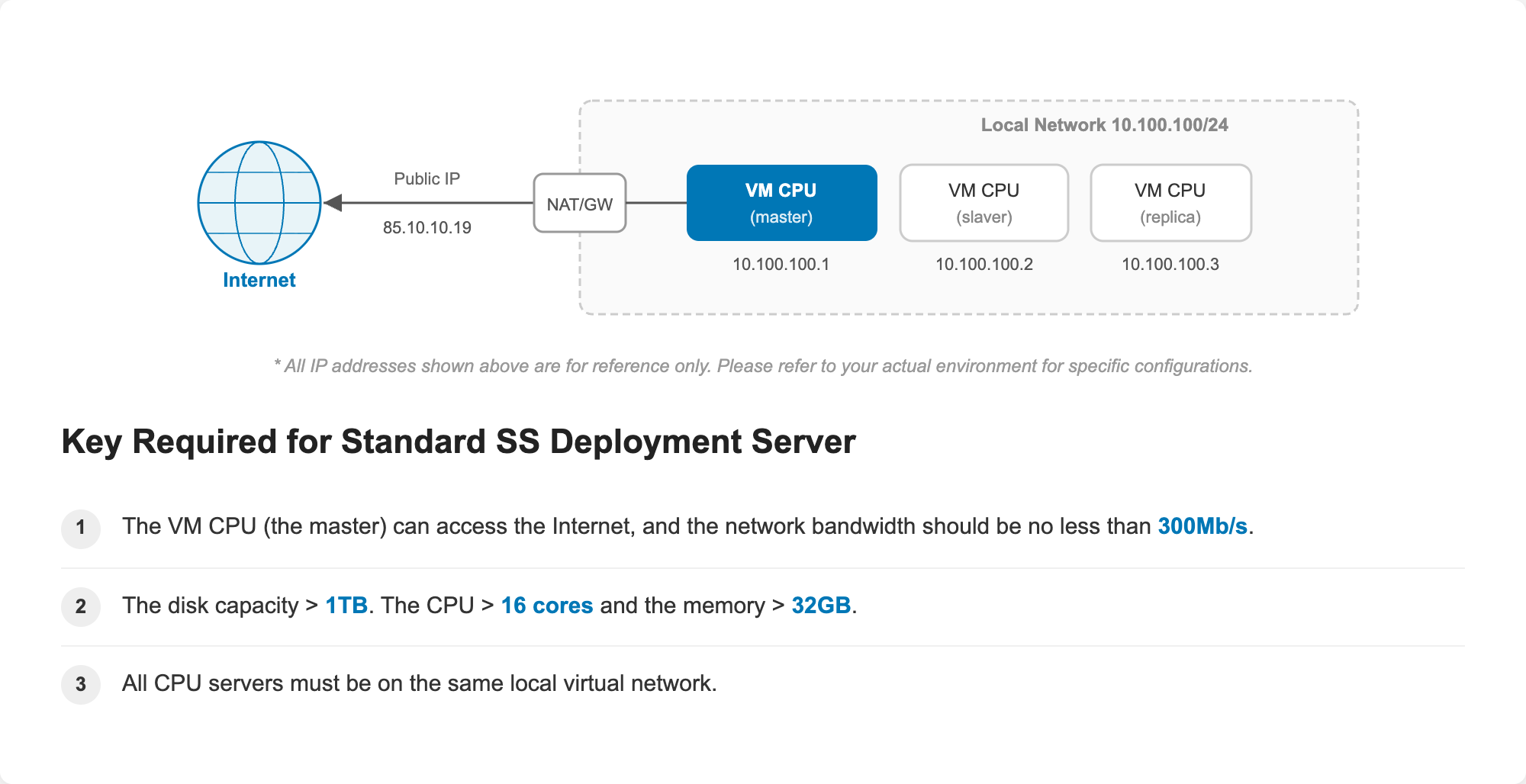
Key Required for Standard SS Deployment Server
- All machines in the cluster can access the public network (Internet).
- The network bandwidth should be no less than 300Mb/s.
- The total disk capacity across all machines in the cluster should be at least 1TB. Each machine must have CPU > 16 cores and memory > 32GB.
- All CPU servers must be on the same local virtual network.
- At least 1 machine in the cluster must have a public IP address.
Minimum Requirements for Deployment (POC)
For a minimal proof-of-concept setup, a single CPU server can be used.
| No. | Basic Server Configuration | Quantity | Purpose |
|---|---|---|---|
| 1 | CPU: 16+ cores, Memory: 32GB+, Storage: 1TB+ | 1 | All services — Kubernetes control plane, CNI, and API Router Platform deployed on one CPU server (without HA guarantee) |
Demo of Network Topology
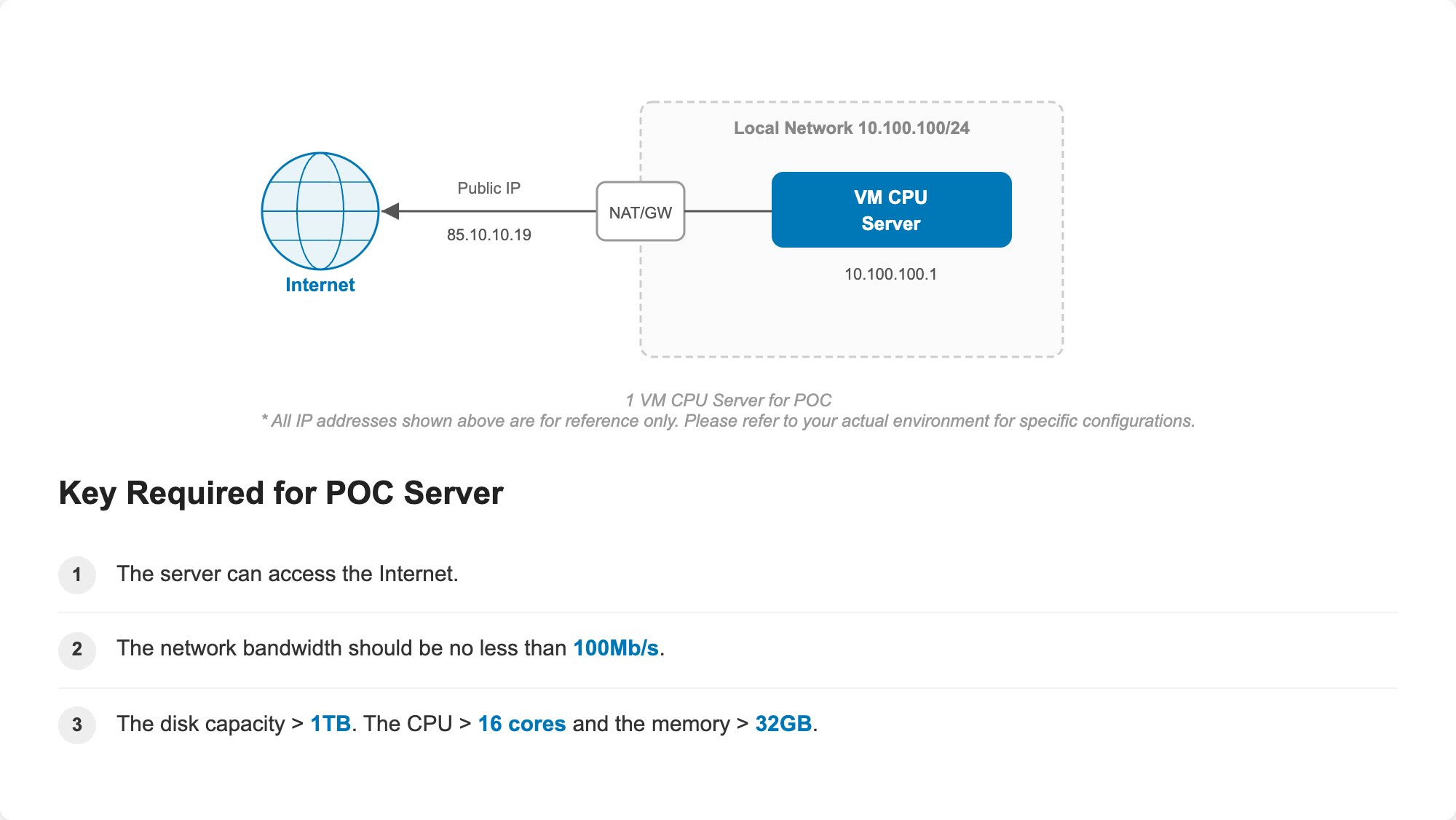
Key Required for POC Server
- The server can access the public network (Internet).
- The network bandwidth should be no less than 100Mb/s.
- The disk capacity > 1TB. The CPU > 16 cores and the memory > 32GB.
- The server must have a public IP address.
- The API Router Platform does not require GPU resources. All platform services run on CPU servers.
- The number of machines must be 1 (POC) or ≥ 3 (standard). 2 machines are not supported.
- For POC deployments, high availability is not guaranteed. Use the standard 3-server deployment for production environments.
- For more technical details about deployment or other configurations, please contact us.
For detailed high-availability deployment guidance across the Kubernetes control plane, CPU-based platform services, storage, databases, GPU management, model serving, and networking, see the High Availability Deployment guide.
FAQ
What operating system is recommended?
Ubuntu, Red Hat, and CentOS are all supported. Ubuntu 24.04 is recommended for the best compatibility and experience.
Will the server requirements (16 cores / 32GB / 1TB) increase as token usage grows?
Yes. The minimum specification of 16 cores, 32GB memory, and 1TB total storage is the baseline for 20M TPM (Tokens Per Minute). When your token usage exceeds 20M TPM, you will need to add 4 cores and 8GB memory per additional capacity tier. Contact us for a tailored sizing recommendation based on your expected traffic.
Can I use cloud VMs instead of on-premise servers?
Yes. You can deploy the API Router Platform on cloud VMs (such as Alibaba Cloud ECS, AWS EC2, etc.) as long as the VMs meet the minimum hardware and network bandwidth requirements listed above. For standard (high-availability) deployments, all VMs must be in the same VPC.
What if my network bandwidth is lower than the recommended value?
Lower bandwidth may cause slow platform deployment, delayed API responses, or timeouts during high-traffic periods. We strongly recommend meeting the minimum bandwidth requirement (300Mb/s for standard, 100Mb/s for POC) to ensure a stable experience.
Do I need to pre-install Docker or Kubernetes on the servers?
No. The Smart Studio deployment process will automatically install and configure all required components, including Docker and Kubernetes. You only need to provide clean servers that meet the hardware and OS requirements.
Important: If Docker or Kubernetes is already installed on the VM, you must uninstall them before deployment.
Can I start with a POC deployment and upgrade to a standard deployment later?
Yes. You can begin with a single-server POC setup to evaluate the platform. When you are ready for production, you can migrate to a standard 3-server deployment for high availability. Contact our support team for migration guidance.
What ports need to be open on the servers?
The servers must allow inbound traffic on the following ports:
| Port | Protocol | Purpose |
|---|---|---|
| 80 | TCP | HTTP traffic |
| 443 | TCP | HTTPS traffic (Admin Console and User Console) |
In addition, the following ports must be free (not occupied by other services) for Kubernetes deployment:
| Port | Purpose |
|---|---|
| 6443 | Kubernetes API server |
| 2379-2380 | etcd client and peer communication |
| 10250 | Kubelet API |
| 10255 | Kubelet read-only port |
| 10256-10259 | Kubernetes controller manager and scheduler |
| 8080 | Kubernetes API server (internal only) |
Can I add more CPU servers to the cluster after initial deployment?
Yes. You can scale the cluster horizontally by adding additional CPU servers after the initial deployment. This is useful when your token usage grows and you need more capacity. Contact our support team for guidance on scaling your cluster.
Next Step
Once your infrastructure meets the requirements above, proceed to Activate Cluster to connect your servers and deploy the API Router Platform.