Credits
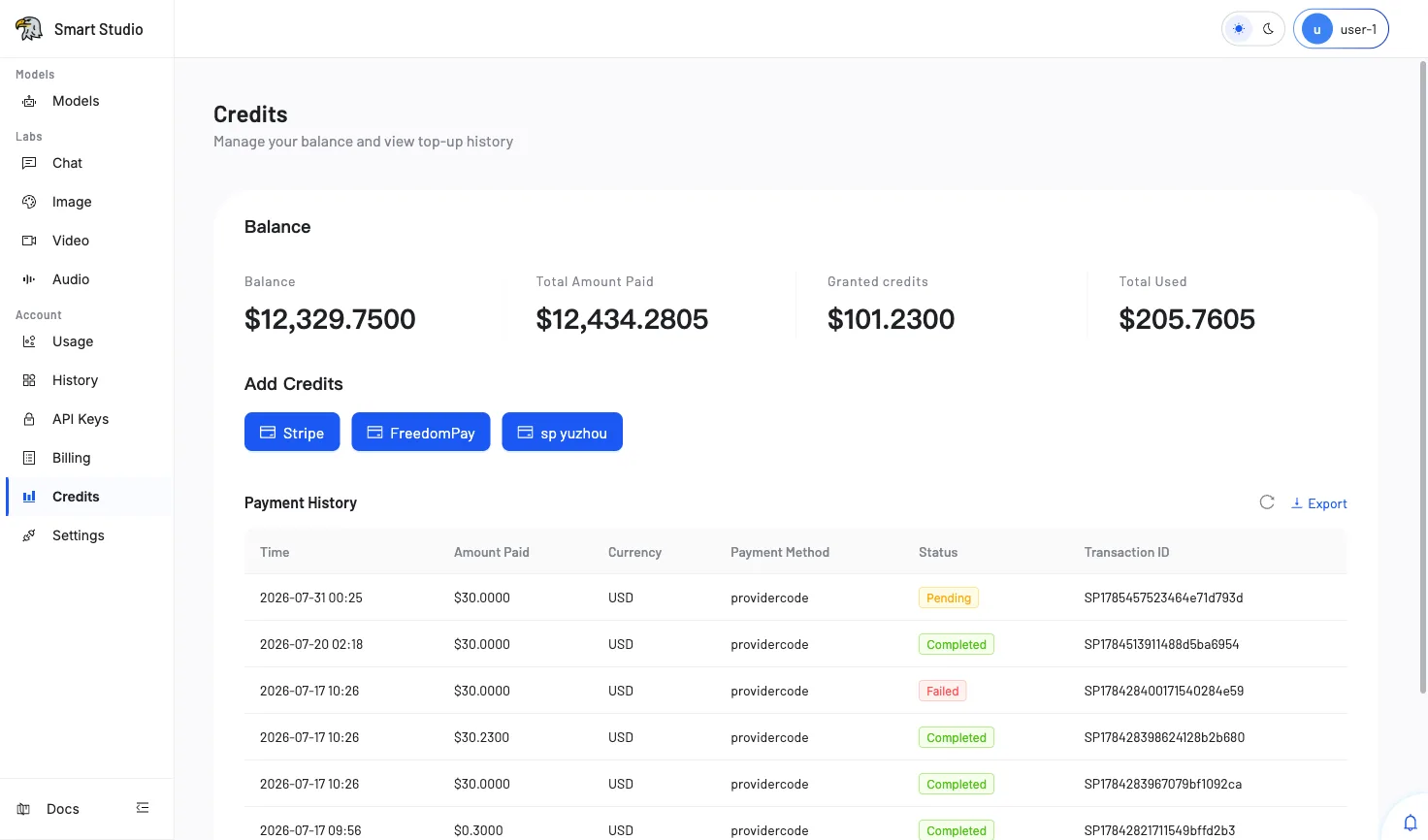
The Credits page shows your tenant's financial overview and provides access to available payment channels for adding funds to your account. It displays the current balance, total payments made, bonus credits received, and total consumption—giving you a complete picture of your account's financial health.
Overview
The Credits page is divided into two main sections:
Balance Summary
At the top, four key metrics provide an at-a-glance financial summary:
- Account Balance — The current available balance for API calls.
- Total Paid — The cumulative amount paid through all payment channels.
- Gift Credits — Bonus credits granted by the platform (e.g., promotional or trial credits).
- Total Consumed — The total amount spent on model API usage.
Payment Channels
Below the balance summary, the available payment methods are displayed as action cards. Depending on your deployment configuration, you may see:
- Stripe — International credit/debit card payments.
- FreedomPay — Alternative payment processing.
- SP Yuzhou — Regional payment channel for supported markets.
Each channel card allows you to initiate a top-up directly from the Credits page.
Recharge History
A table at the bottom tracks all past recharge transactions, including payment method, amount, status, and timestamp.
Add Credits
- Open Account → Credits from the console navigation.
- Review the current Account Balance to determine how much to add.
- Select one of the available payment channel cards (e.g., Stripe, FreedomPay, or SP Yuzhou).
- Enter the desired recharge amount in the payment dialog.
- Complete the checkout flow provided by the payment provider.
- Return to the Credits page and confirm the updated balance and new recharge history entry.
Verify the Result
After completing a payment:
- The Account Balance should reflect the added amount.
- The Total Paid metric should increase by the payment amount.
- A new row appears in the Recharge History table with a successful status.
Payment processing may take a few moments. If the balance does not update immediately, wait 30 seconds and refresh the page.
Troubleshooting
- If no payment channel cards are visible, contact the administrator responsible for payment-provider configuration.
- If checkout was cancelled or the payment failed, confirm the transaction status with your payment provider before retrying.
- Avoid creating repeated payments while a provider callback is still pending—duplicate charges may occur.
- If Gift Credits are not appearing, verify eligibility with the platform administrator.
Tips
- Monitor the Account Balance before running batch workloads to avoid mid-process interruptions.
- Gift Credits are consumed before paid credits in most configurations.
- The Recharge History table can be used for internal accounting and expense reporting.
- Set up usage alerts (if available) to receive notifications when the balance drops below a threshold.
Next Step
Return to API Overview and retry the model request after the balance is available, or review Billing for detailed spending breakdowns.