Billing
Use the Billing page to review the current balance and detailed usage-based billing records for your tenant account. The page provides comprehensive filtering, model-level breakdowns, and export functionality to help you track and reconcile API spending.
Overview
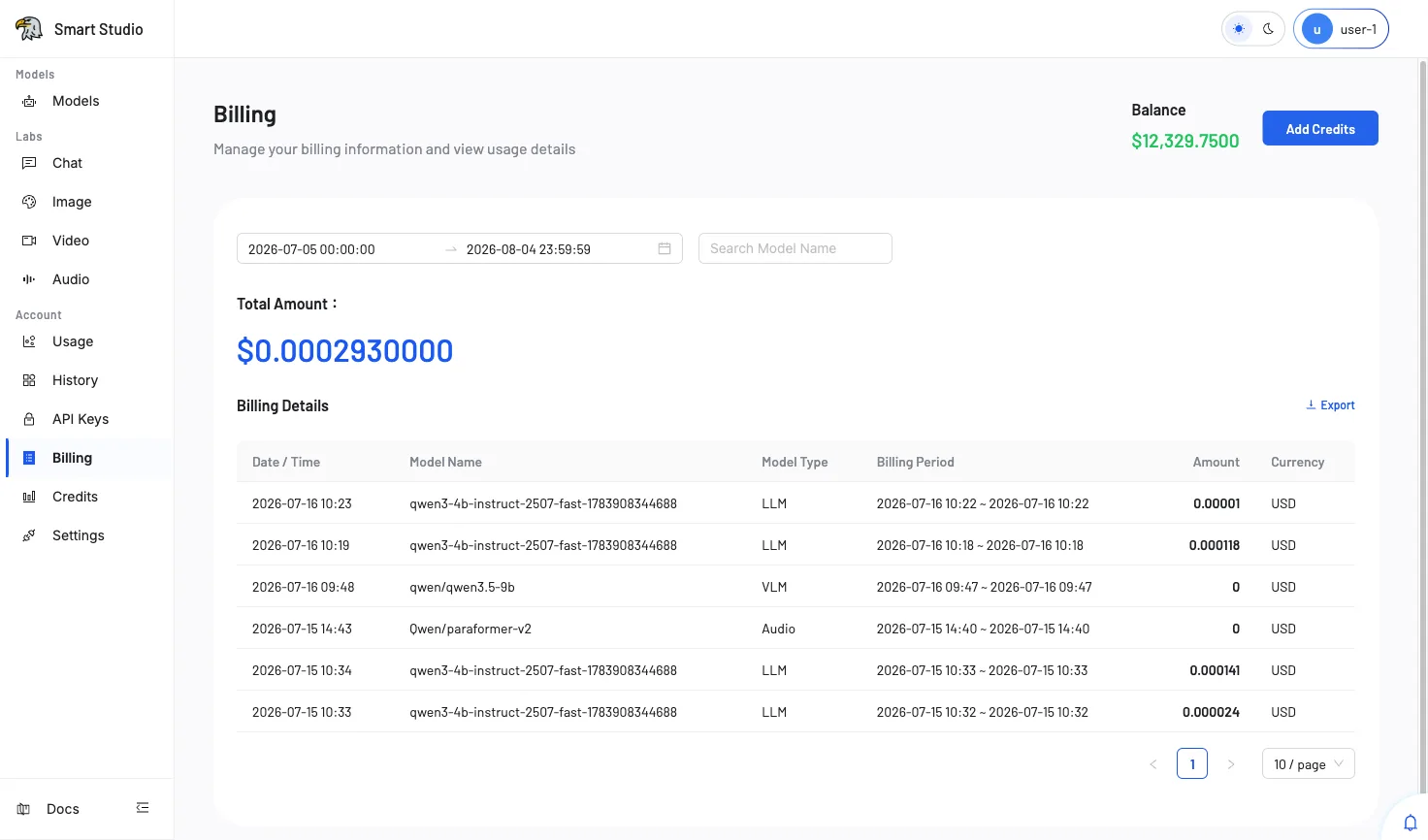
The Billing page displays your account's financial summary and a detailed transaction log for all model API calls. Key elements include:
- Total Amount — The aggregated spend for the selected time range, displayed prominently in the tenant's configured currency.
- Billing Details — A paginated table showing individual billing records with model-level granularity.
- Date Range Filter — Select a specific time window to narrow the billing records.
- User and Model Filters — Drill down into specific users or models to isolate spending.
- Export — Download filtered billing data for external reconciliation or reporting.
Review Billing
- Open Account → Billing from the console navigation.
- Set the date range to the period you want to investigate. The default shows the current day.
- Optionally filter by User ID, user name, or model name to narrow results.
- Review the Total Amount displayed for the filtered period.
- Scroll through the Billing Details table for individual transaction records.
- Click Export to download the filtered records as a file.
Billing Details Fields
| Column | Description |
|---|---|
| User ID | The numeric identifier of the customer who made the request. |
| User Name | The display name associated with the user account. |
| Date / Time | The timestamp when the billing event occurred. |
| Model Name | The specific model that processed the request. |
| Input | The number of input tokens (or units) consumed by the request. |
| Output | The number of output tokens (or units) generated by the model. |
| Model Type | The category of the model (e.g., LLM, Audio, Image). |
| Billing Period | The billing cycle this charge belongs to. |
| Amount | The monetary cost for this individual request. |
| Currency | The currency in which the amount is denominated. |
Filter and Export
Use the filters at the top of the page to narrow billing records:
- Date Range — Set start and end timestamps to define the analysis window.
- Search User ID — Enter a specific user ID for targeted lookup.
- Search or select user — Choose from a dropdown of active users.
- Search or select model — Filter records to a specific model.
Click the Export button above the Billing Details table to download the currently filtered data set.
Verify the Result
The balance and billing records should cover the expected period. Cross-reference unexpected charges with Usage and History for request-level evidence.
Troubleshooting
- If a request is missing, verify the selected time range and tenant context.
- If the balance is insufficient for further API calls, open Credits to add funds.
- If the amount cannot be reconciled, preserve the billing period and relevant request identifiers before contacting support.
- If the Export button does not respond, ensure the filter returns at least one record.
Next Step
Review Credits when the account needs additional balance, or check Usage for real-time consumption metrics.