Supervised Fine-tuning (SFT)
Learn how to fine-tune large language models for text-based tasks using supervised learning with custom datasets in MSP.
Purpose and overview
Supervised fine-tuning (SFT) adapts pre-trained language models to specific use cases and domains. SFT customizes model behavior, improves domain-specific performance, and enhances contextual understanding.
Step 1: Model & datasets
Select a training method, fine-tuning profile, parameter scope, base model, and datasets for the SFT training task.
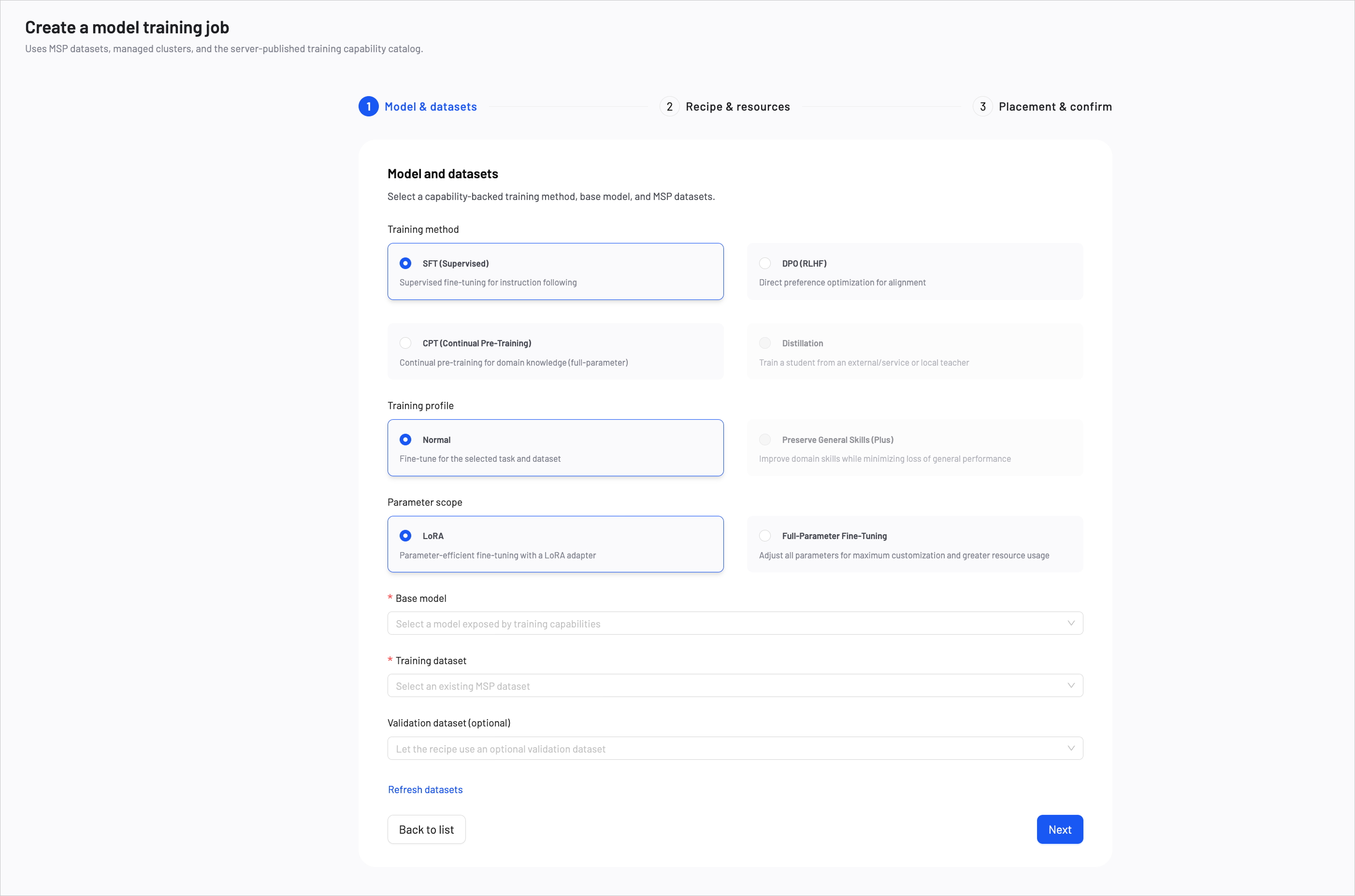
1. Choose a training method
Select SFT (Supervised) as the training method.
Fine-tuning options
SFT for MSP provides the following optional settings.
Training profile
- Normal (Default): Fine-tune for the selected task and dataset.
Parameter scope
- LoRA (Default): Parameter-efficient fine-tuning with a LoRA adapter. LoRA reduces computational cost and memory usage. Recommended for most use cases.
- Full-Parameter Fine-Tuning: Adjust all parameters for maximum customization and greater resource usage.
2. Choose a base model
Select a base model as the foundation for fine-tuning. The available models are determined by the training capability catalog. The choice of base model impacts the final performance and capabilities of the fine-tuned model. For detailed model comparisons and selection criteria, see How to Choose Models.
- Start with Instruct models for most conversational applications. (e.g.,
Qwen3-4B-Instruct-2507) - Choose Thinking models when your task requires step-by-step reasoning. (e.g.,
Qwen3-4B-Thinking-2507) - Use base (Dense) models when you need maximum customization flexibility. (e.g.,
Qwen3-4B) - Consider MOE models for production deployments requiring both high performance and efficiency. (e.g.,
Qwen3-30B-A3B)
3. Select datasets
Training dataset
Select an existing MSP dataset for training. If you haven't created a dataset yet, see Create Datasets or use AI Dataset Preparation to automate the process.
Validation dataset (optional)
Optionally provide a separate validation dataset to monitor training progress. If not provided, the system can use auto-carveout to reserve a portion of the training data for evaluation.
- File format: JSONL — each line must be a valid JSON object representing one training example.
- Recommended size: 100–100,000 examples. Start with smaller datasets for initial experiments and scale up based on performance needs.
- Training and validation datasets must be different.
Required data format
- SFT-LLM
- SFT-VLM
{
  "messages": [
    {"role": "system", "content": "<system>"},
    {"role": "user", "content": "<query1>"},
    {"role": "assistant", "content": "<response1>"},
    {"role": "user", "content": "<query2>"},
    {"role": "assistant", "content": "<response2>"}
  ]
}
Format Explanation:
- system: Optional system prompt defining model behavior and context
- user: User input or query for the model to respond to
- assistant: Expected model response for the given user input
Each line in the JSONL file must contain one complete conversation example.
Example Data Formats:
{"messages": [
  {"role": "system", "content": "You are a useful and harmless assistant"},
  {"role": "user", "content": "Tell me the weather tomorrow"},
  {"role": "assistant", "content": "Sunny tomorrow"}
]}
{"messages": [
  {"role": "user", "content": "What is the capital of France?"},
  {"role": "assistant", "content": "The capital of France is Paris."}
]}
{"messages": [
  {"role": "system", "content": "You are a technical support assistant"},
  {"role": "user", "content": "How do I reset my password?"},
  {"role": "assistant", "content": "To reset your password, follow these steps:
    1. Go to the login page
    2. Click 'Forgot Password'
    3. Enter your email address
    4. Check your email for reset instructions"
  }
]}
{
  "messages": [
    {"role": "system", "content": "<system>"},
    {"role": "user", "content": "<query1>"},
    {"role": "assistant", "content": "<response1>"}
  ],
  "images": ["/xxx/x.jpg", "/xxx/x.png"]
}
Format Explanation:
- When user-content contains placeholders like
<image>, they should correspond to the order in the images field, with matching quantities - When
<image>count is 0, it corresponds to LLM-SFT, allowing 0 images <image>only appears in user-content
Example Data Formats:
{"messages": [
  {"role": "user", "content": "Where is the provincial capital of Zhejiang?"},
  {"role": "assistant", "content": "The provincial capital of Zhejiang is in Hangzhou. "}
]}
{"messages": [
  {"role": "user", "content": "<image><image>What's the difference between these two images?"},
  {"role": "assistant", "content": "The first one is a kitten, the second one is a puppy"}
],
"images": ["/xxx/x.png"]
}
{"messages": [
  {"role": "user", "content": "<audio>What did the voice say?"},
  {"role": "assistant", "content": "Today's weather is really nice"}
],
"audios": ["/xxx/x.mp3"]
}
{"messages": [
  {"role": "system", "content": "You are a helpful assistant"},
  {"role": "user", "content": "<image>What's in the picture, <video>what's in the video"},
  {"role": "assistant", "content": "There's an elephant in the picture, and a puppy lying on the grass in the video"}
],
"images": ["/xxx/x.jpg"],
"videos": ["/xxx/x.mp4"]
}
- Ensure diverse examples covering different scenarios and edge cases
- Maintain consistent response quality and style throughout the dataset
- Include both positive and negative examples where applicable
- Validate that all examples follow the required JSON schema
- For VLM datasets, ensure image/audio/video paths are valid and accessible
After completing all selections, click Next.
Step 2: Recipe & resources
Configure the training recipe, resource specification, and training parameters. Options are loaded from the signed MSP training capability catalog.
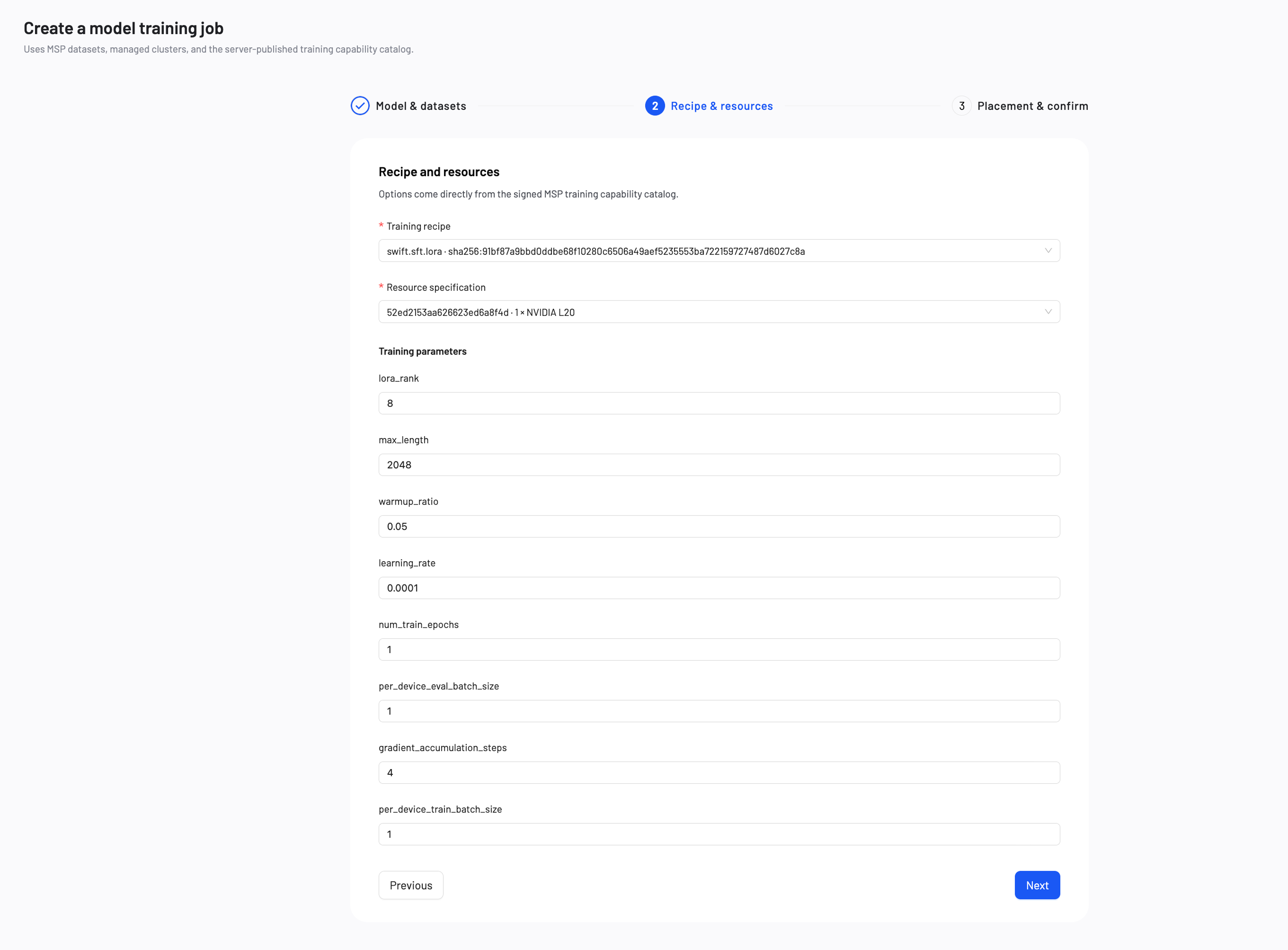
Training Recipe: Select a recipe version for the chosen base model and training configuration.
Resource Specification: Select a resource specification that defines the GPU type and count required for training.
Training parameters
The following parameters apply to SFT training. LoRA is the default fine-tuning method.
| Parameter | Definition | Tuning Impact |
|---|---|---|
| lora_rank | Sets the learning capacity of the LoRA adapters. Available when Full-Parameter Fine-Tuning is not selected. | Increase (e.g., 16, 32): Improves the model's ability to learn complex tasks, but uses more GPU memory. Decrease (e.g., 4, 8): Reduces GPU memory usage, but the model may struggle with complex tasks. |
| max_length | Sets the maximum token limit per example. Texts exceeding this limit will be truncated. | Increase to learn from longer texts, but this significantly increases GPU memory usage. |
| warmup_ratio | Specifies the fraction of the training process to use for a "warm-up" phase. During this phase, the learning rate slowly increases to prevent early training instability. | A small value (0.03–0.1) is generally recommended. This is primarily a stability mechanism, not a performance tuning parameter. |
| learning_rate | Controls the size of each adjustment the model makes during training. | Increase: The model learns faster, but training may become unstable. Decrease: Training becomes more stable, but convergence takes longer. |
| num_train_epochs | The number of complete passes through the training dataset. | Increase: More learning opportunities, but the model may overfit to the training data. Decrease: Trains faster, but the model may not learn enough to perform well. |
| per_device_eval_batch_size | Number of evaluation examples processed per device during validation. | Increase: Faster evaluation but higher memory usage. Decrease: Lower memory usage but slower evaluation. |
| gradient_accumulation_steps | Specifies the number of small batches to process before the model performs a single learning update. This simulates a larger batch size to save memory. | Increase to achieve more stable training at the cost of slower speed. A value of 1 disables this feature. |
| per_device_train_batch_size | Number of training examples processed per device in a single forward/backward pass. | Increase: Produces more consistent training updates, but uses significantly more GPU memory. Decrease: Reduces GPU memory usage, but training updates may become less consistent. |
After reviewing and checking all the configuration, click Next.
Step 3: Placement & confirm
Select an MSP-managed cluster, name the task and output model to post-train the model.
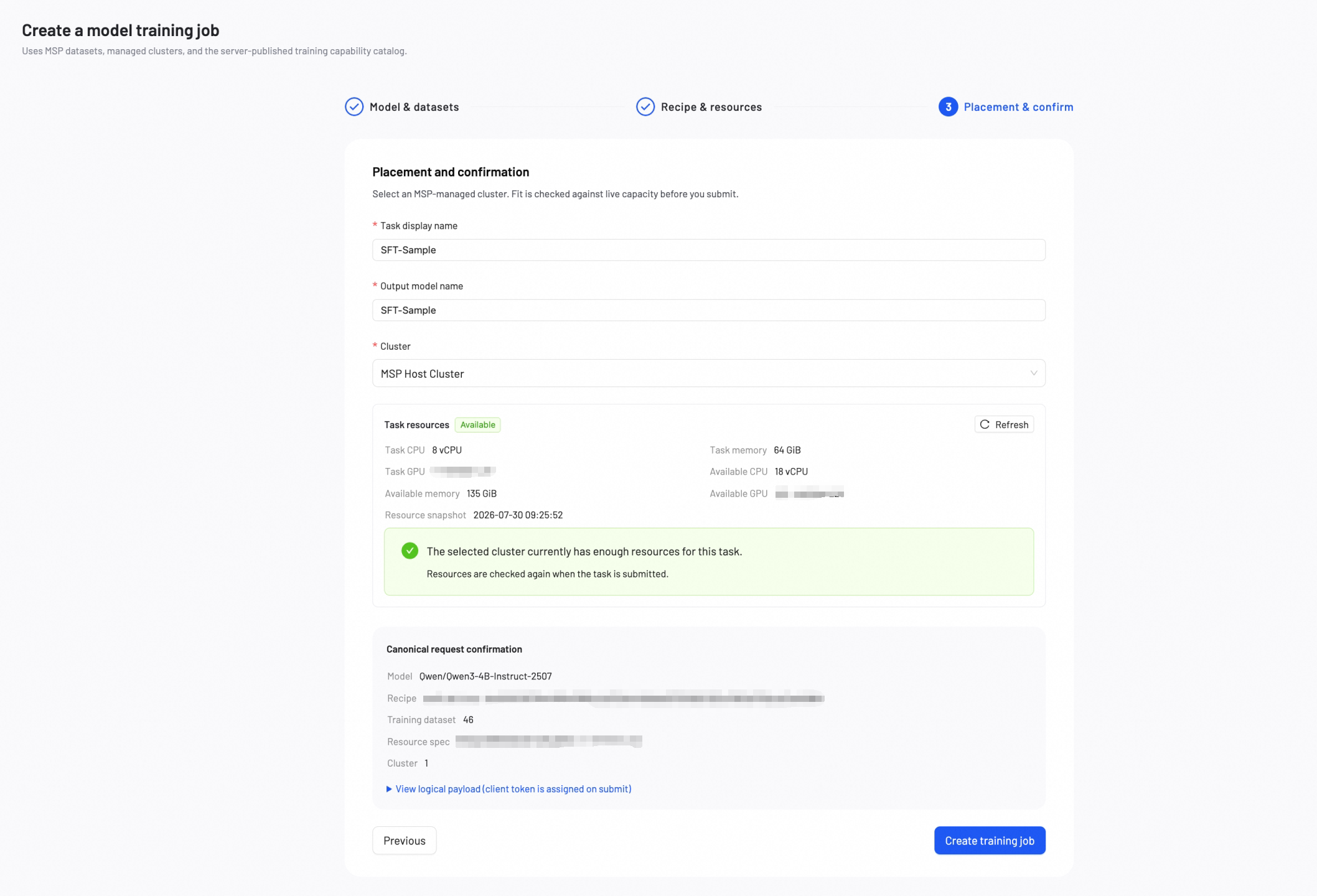
Basic configuration
Task Display Name: A name for the fine-tuning task, shown in the task list.
Output Model Name: A name for the output model, shown in My Models.
Cluster Selection: Select an MSP-managed cluster for training. The cluster must have the required GPU type and capacity for the selected resource specification.
Canonical request confirmation
Before submitting, review the canonical request summary including model, recipe, datasets, resource specification, and cluster placement. You can expand the logical payload for detailed inspection.
Click Create training job to begin the training process.
Monitor training progress
During and after training, check key training metrics at any time. Once you're satisfied with the model's performance, you can deploy it or download the model weights at any time.
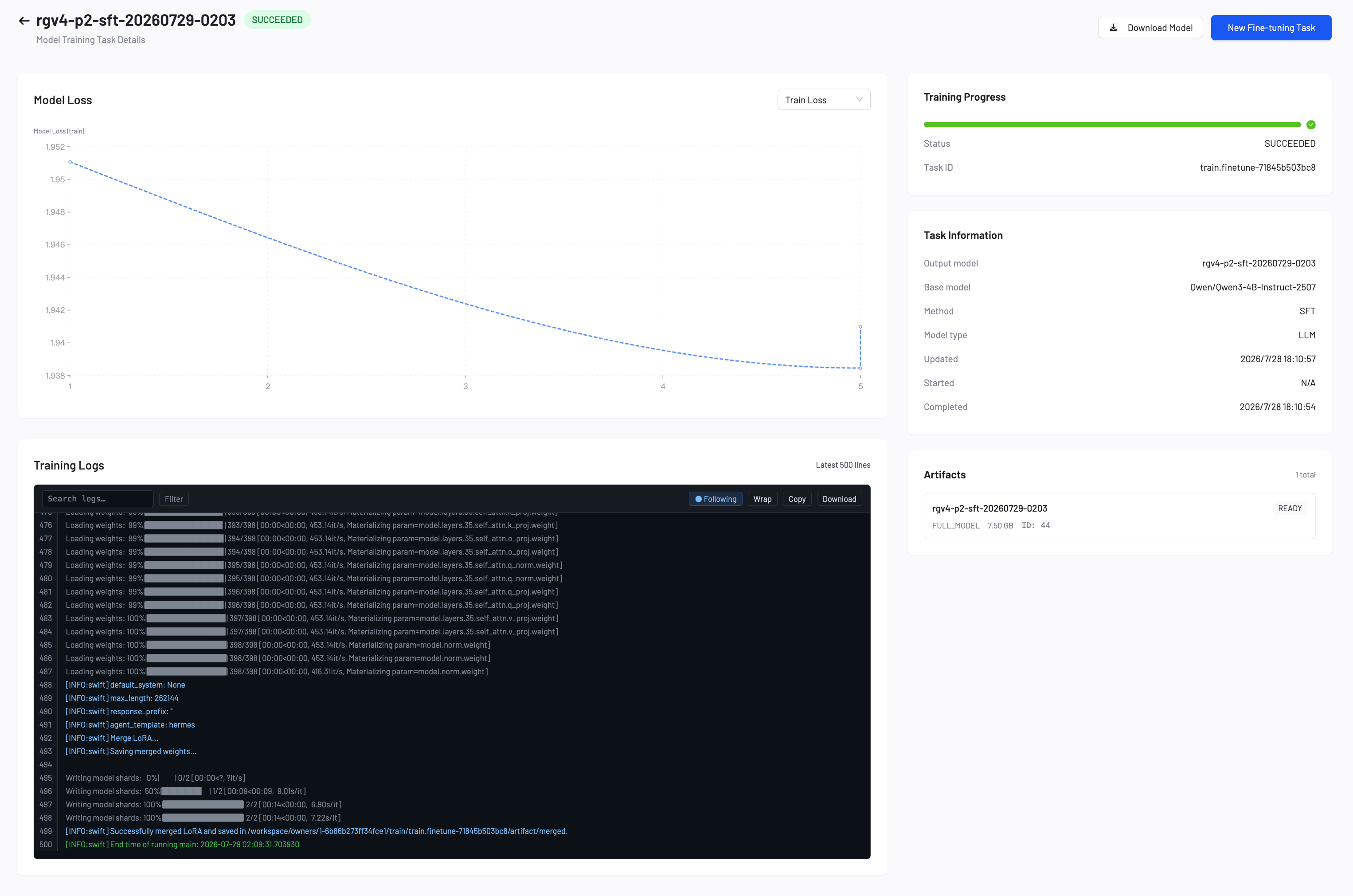
The Model Loss chart displays two metrics:
- Training Loss: Measures how well the model learns from your training data.
- Validation Loss: Measures how well the model generalizes to unseen data.
- If both losses decrease steadily, your model is learning well. Continue training.
- If training loss decreases but validation loss increases, your model may be overfitting. Stop training and deploy the current model.
- If both losses remain high or increase, your training data or configuration may need adjustment. Review your dataset and parameters.
Parameter tuning guidelines
- Start with defaults: Default values work well for most use cases.
- Increase LoRA rank: Increase to 16, 32, 64, or 128 for complex tasks.
- Adjust learning rate: Lower values for stable training, higher values for faster convergence.
- Monitor validation loss: Watch for a decrease in validation loss.
Next steps
Deploy the fine-tuned model to a production endpoint for real-world usage.
Measure model performance with benchmark or AI auto-evaluation.