Continual Pre-training (CPT)
Learn how to adapt large language models to new domains using continual pre-training (CPT) with domain-specific corpora in MSP.
Purpose and overview
Continual pre-training (CPT) adapts a pre-trained model to new domains by continuing the pre-training process on domain-specific data. Unlike SFT which teaches the model specific tasks through question-answer pairs, CPT injects new domain knowledge and terminology into the model's weights. CPT is commonly used to expand a model's knowledge base, adapt it to specialized domains (e.g., medical, legal, finance), or support new languages.
Step 1: Model & datasets
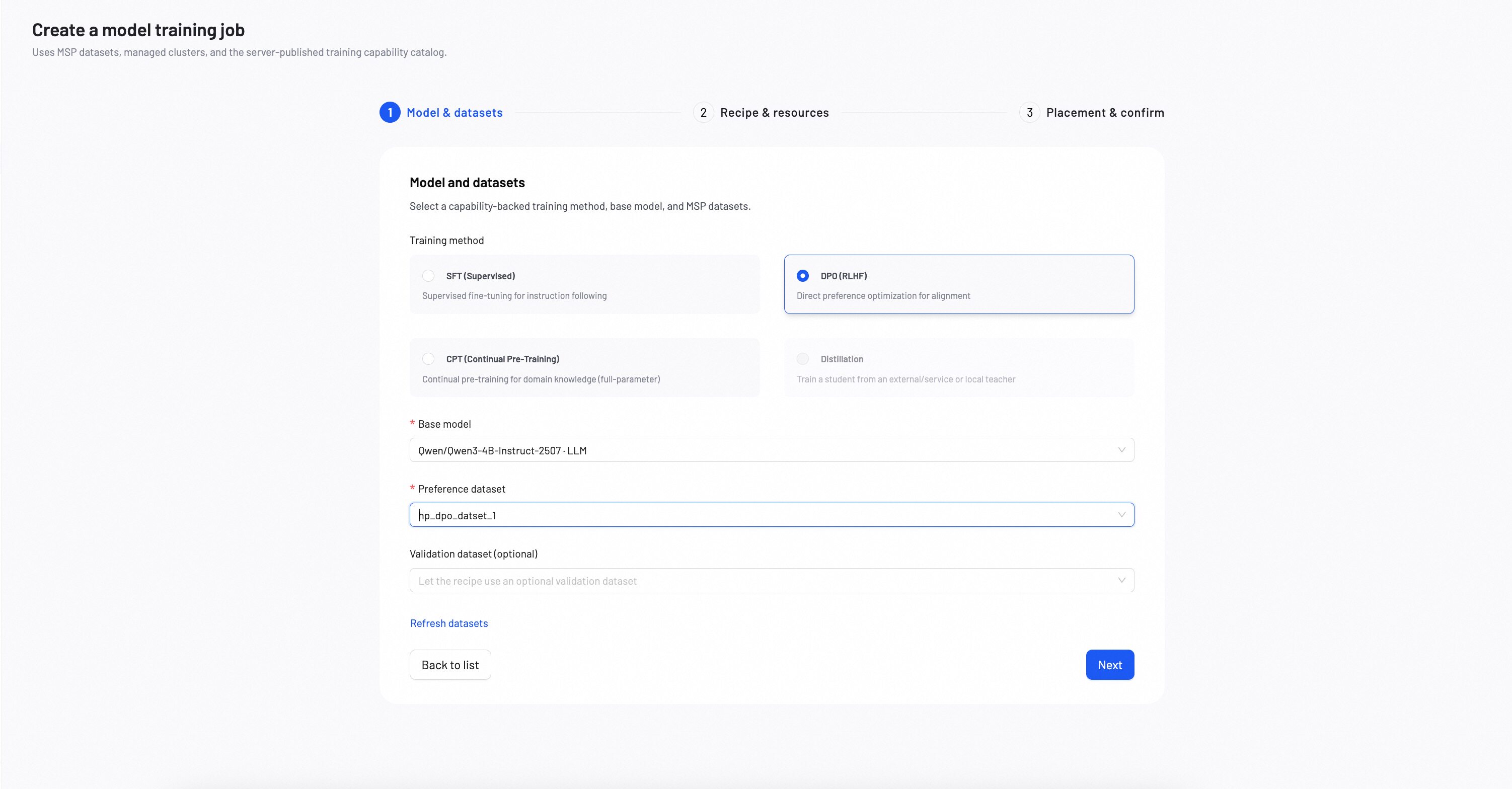
Select a base model and datasets for the CPT training task.
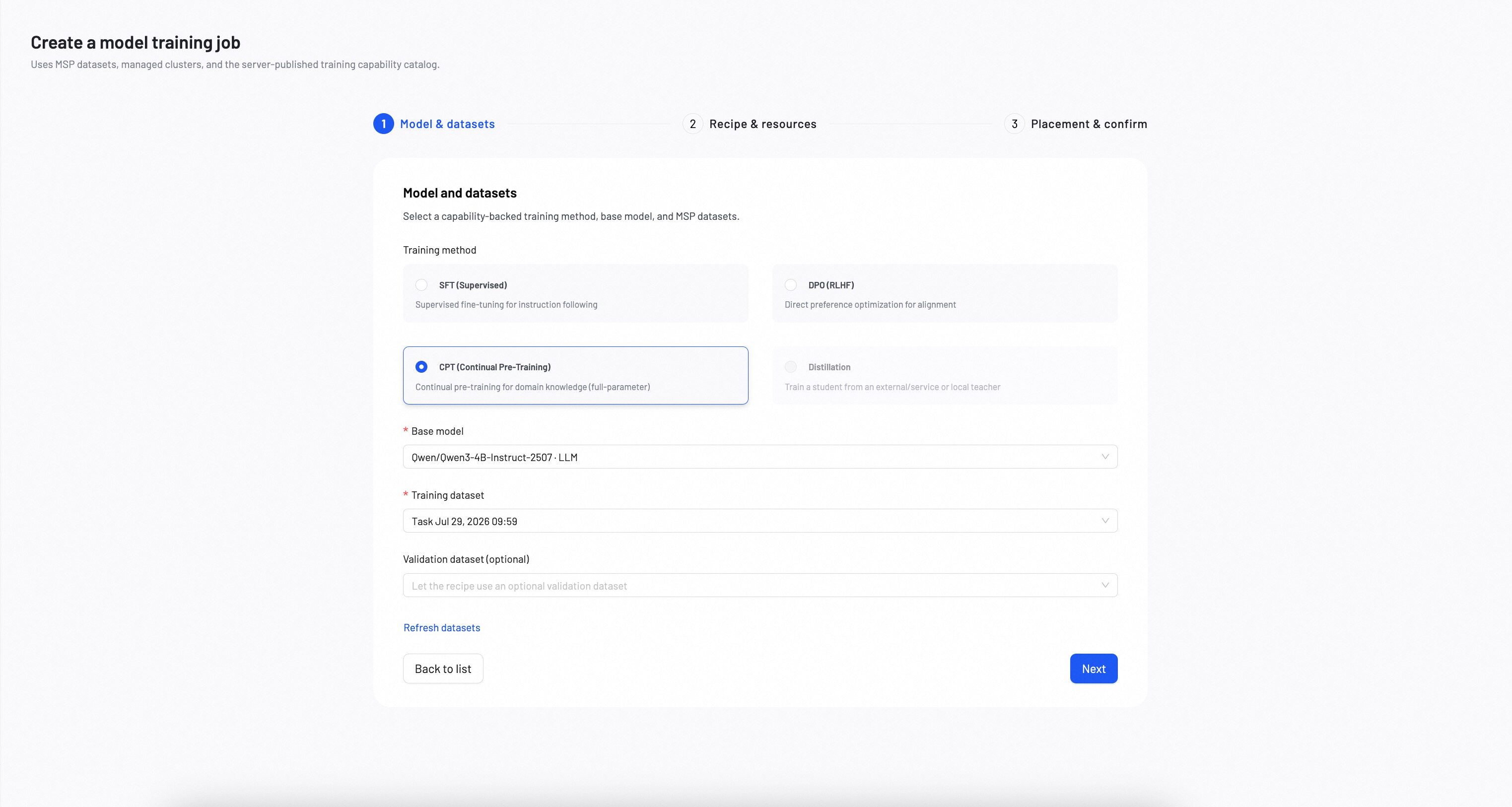
1. Choose a training method
Select CPT as the training method.
2. Choose a base model
Select a base model as the foundation for continual pre-training. The choice of base model impacts the final performance and capabilities of the fine-tuned model. For detailed model comparison and selection criteria, see How to Choose Models.
- CPT is a full-parameter training method — ensure sufficient compute resources are available.
3. Select datasets
Training dataset
Select an existing MSP dataset for CPT training. If you haven't created a dataset yet, see Create Datasets.
Validation dataset (optional)
Optionally provide a separate validation dataset to monitor training progress. If not provided, the system can use auto-carveout to reserve a portion of the training data for evaluation.
- File format: JSONL — each line must be a valid JSON object.
- Recommended size: 100–100,000 examples. Start with smaller datasets for initial experiments and scale up based on performance needs.
- CPT and validation datasets must be different.
Required data format
CPT uses a single text-only data format:
{"messages": [{"role": "assistant", "content": "<domain text>"}]}
Format explanation
- messages: Contains a single assistant message with the domain text content.
Example data formats
{"messages": [{"role": "assistant", "content": "The mitochondria is the powerhouse of the cell."}]}
{"messages": [{"role": "assistant", "content": "Habeas corpus is a fundamental legal principle."}]}
{"messages": [{"role": "assistant", "content": "Photosynthesis converts light energy into chemical energy."}]}
- Use high-quality, representative domain text that covers the knowledge you want to inject
- Ensure text is clean and well-formatted — remove noise, duplicates, and irrelevant content
- Larger and more diverse corpora generally lead to better domain adaptation
After completing all selections, click Next.
Step 2: Recipe & resources
Configure the training recipe, resource specification, and training parameters. Options are loaded from the signed MSP training capability catalog.
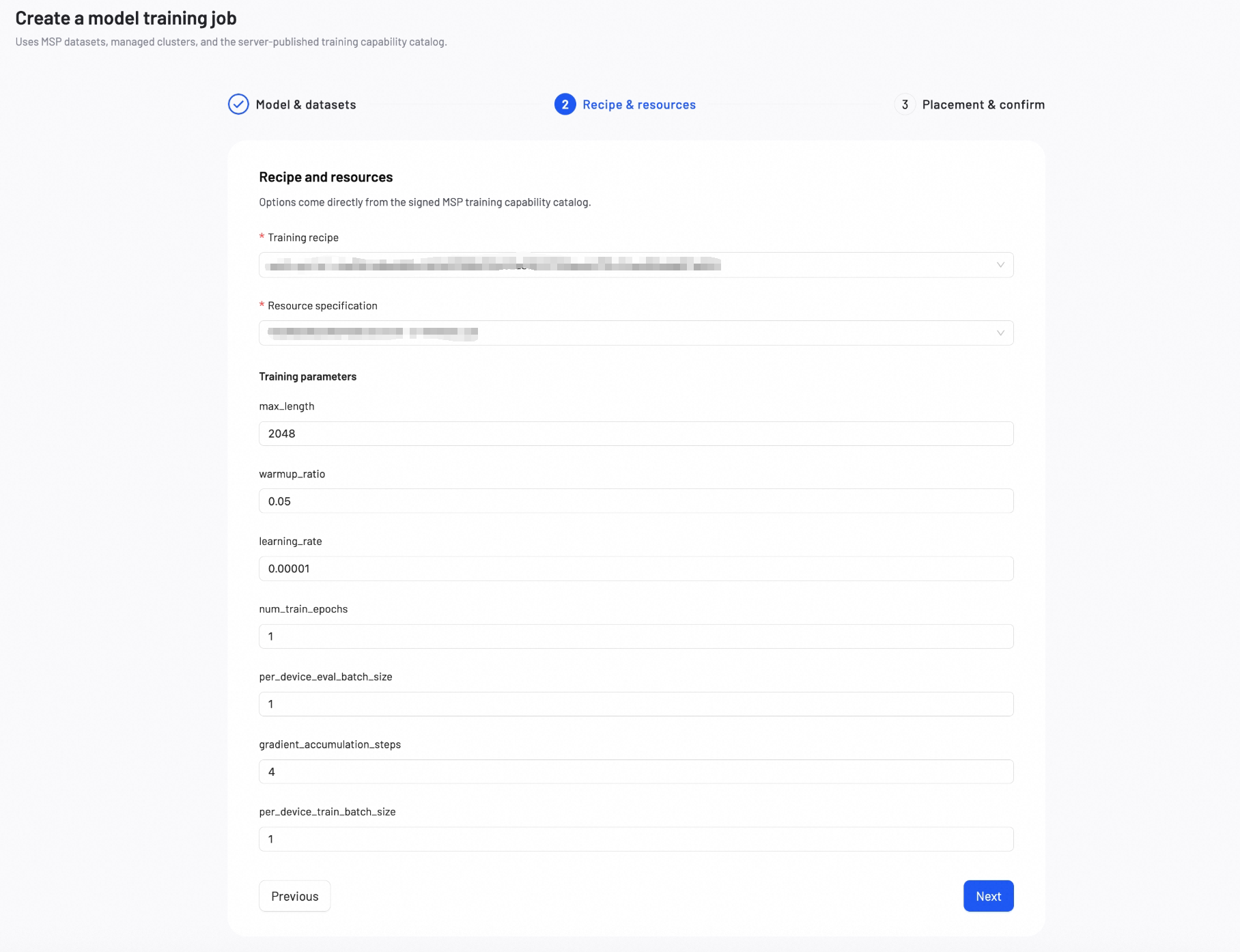
Training Recipe: Select a recipe version for the chosen base model and CPT training configuration.
Resource Specification: Select a resource specification that defines the GPU type and count required for training.
Training parameters
The following parameters apply to CPT training. CPT uses full-parameter training.
| Parameter | Definition | Tuning Impact |
|---|---|---|
| max_length | Sets the maximum token limit per example. Texts exceeding this limit will be truncated. | Increase to learn from longer texts, but this significantly increases GPU memory usage. |
| warmup_ratio | Specifies the fraction of the training process to use for a "warm-up" phase. During this phase, the learning rate slowly increases to prevent early training instability. | A small value (0.03–0.1) is generally recommended. This is primarily a stability mechanism, not a performance tuning parameter. |
| learning_rate | Controls the size of each adjustment the model makes during training. | Increase: The model adapts to new domain knowledge faster, but training may become unstable. Decrease: Training becomes more stable, but convergence takes longer and domain adaptation may be incomplete. |
| num_train_epochs | The number of complete passes through the training dataset. | Increase: More exposure to domain data, but the model may overfit to the training corpus. Decrease: Trains faster, but the model may not fully absorb the domain knowledge. |
| per_device_eval_batch_size | Number of evaluation examples processed per device during validation. | Increase: Faster evaluation but higher memory usage. Decrease: Lower memory usage but slower evaluation. |
| gradient_accumulation_steps | Specifies the number of small batches to process before the model performs a single learning update. This simulates a larger batch size to save memory. | Increase to achieve more stable training at the cost of slower speed. A value of 1 disables this feature. |
| per_device_train_batch_size | Number of training examples processed per device in a single forward/backward pass. | Increase: Produces more consistent training updates, but uses significantly more GPU memory. Decrease: Reduces GPU memory usage, but training updates may become less consistent. |
After reviewing and checking all the configuration, click Next.
Step 3: Placement & confirm
Select an MSP-managed cluster, name the task and output model to post-train the model.
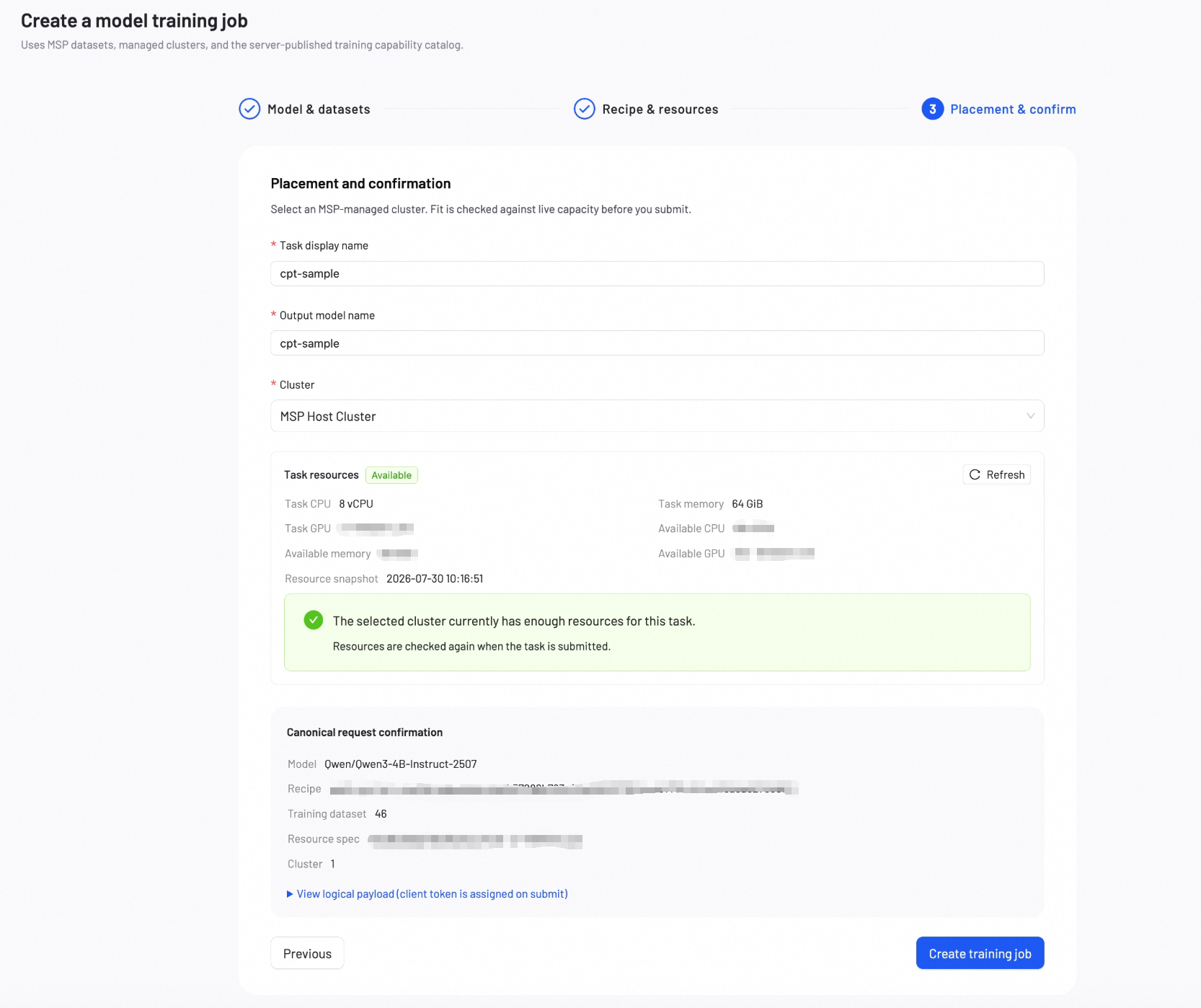
Basic configuration
Task Display Name: A name for the fine-tuning task, shown in the task list.
Output Model Name: A name for the output model, shown in My Models.
Cluster Selection: Select an MSP-managed cluster for training. The cluster must have the required GPU type and capacity for the selected resource specification.
Canonical request confirmation
Before submitting, review the canonical request summary including model, recipe, datasets, resource specification, and cluster placement. You can expand the logical payload for detailed inspection.
Click Create training job to begin the training process.
Monitor training progress
During and after training, check key training metrics at any time. Once you're satisfied with the model's performance, you can deploy it or download the model weights at any time.
The Model Loss chart displays two metrics:
- Training Loss: Measures how well the model learns from your domain data.
- Validation Loss: Measures how well the model generalizes to unseen domain data.
- If both losses decrease steadily, your model is absorbing the domain knowledge well. Continue training.
- If training loss decreases but validation loss increases, your model may be overfitting to the training corpus. Stop training and deploy the current model.
- If both losses remain high or increase, your domain data or configuration may need adjustment. Review your dataset and parameters.
Parameter tuning guidelines
- Start with defaults: Default values work well for most use cases.
- Adjust learning rate: CPT typically uses a smaller learning rate than SFT to avoid catastrophic forgetting. Lower values for stable training, higher values for faster domain adaptation.
- Monitor validation loss: Watch for a decrease in validation loss as the primary indicator of successful domain adaptation.
Next steps
Deploy the fine-tuned model to a production endpoint for real-world usage.
Measure model performance with benchmark or AI auto-evaluation.